Phishing is one of the most common ways cybercriminals gain access to accounts and personal data. It relies on deceptive techniques rather than technical skill or hacking.
Attackers pretend to be trusted organizations or people and pressure victims into clicking links, downloading harmful files, or entering sensitive information.
Learning how phishing works (and how to spot phishing scams) can prevent account compromise or identity theft from impacting your life and finances.
What you need to know:
- Phishing is a category of scams that impersonate trusted sources to trick people into sharing sensitive information or installing malware
- Email, text messages, phone calls, and social media are common delivery methods for phishing attacks
- Most cyberattacks start with phishing. It is a primary entry point for data breaches and account takeovers
- Urgency and fear are key tactics, such as warnings about account suspension or unpaid bills
- Simple habits like verifying links and enabling multi-factor authentication (MFA) can significantly reduce risk
What is phishing?
Phishing is a type of cyberattack where criminals impersonate a trusted person or organization to trick users into revealing sensitive information or installing malicious software.
The goal is usually to steal login credentials or personal data, but phishing can also be used to deliver malware or gain access to accounts. These attacks often arrive as emails or messages that appear legitimate at first glance but are designed to deceive the recipient.
Because phishing targets human behavior, it remains one of the most common ways attackers gain initial access to accounts, devices, or systems. Attackers try to gain access through a single phishing message and then move deeper into accounts or systems to steal data or commit fraud.
Phishing is widely regarded as the most common type of cybercrime. The FBI’s Internet Crime Report shows twice as many phishing and spoofing attacks were reported compared to any other form of scam.
How does phishing work?
Phishing works by making a fake request look real before guiding the victim toward an action that gives the attacker access to money or valuable personal information.
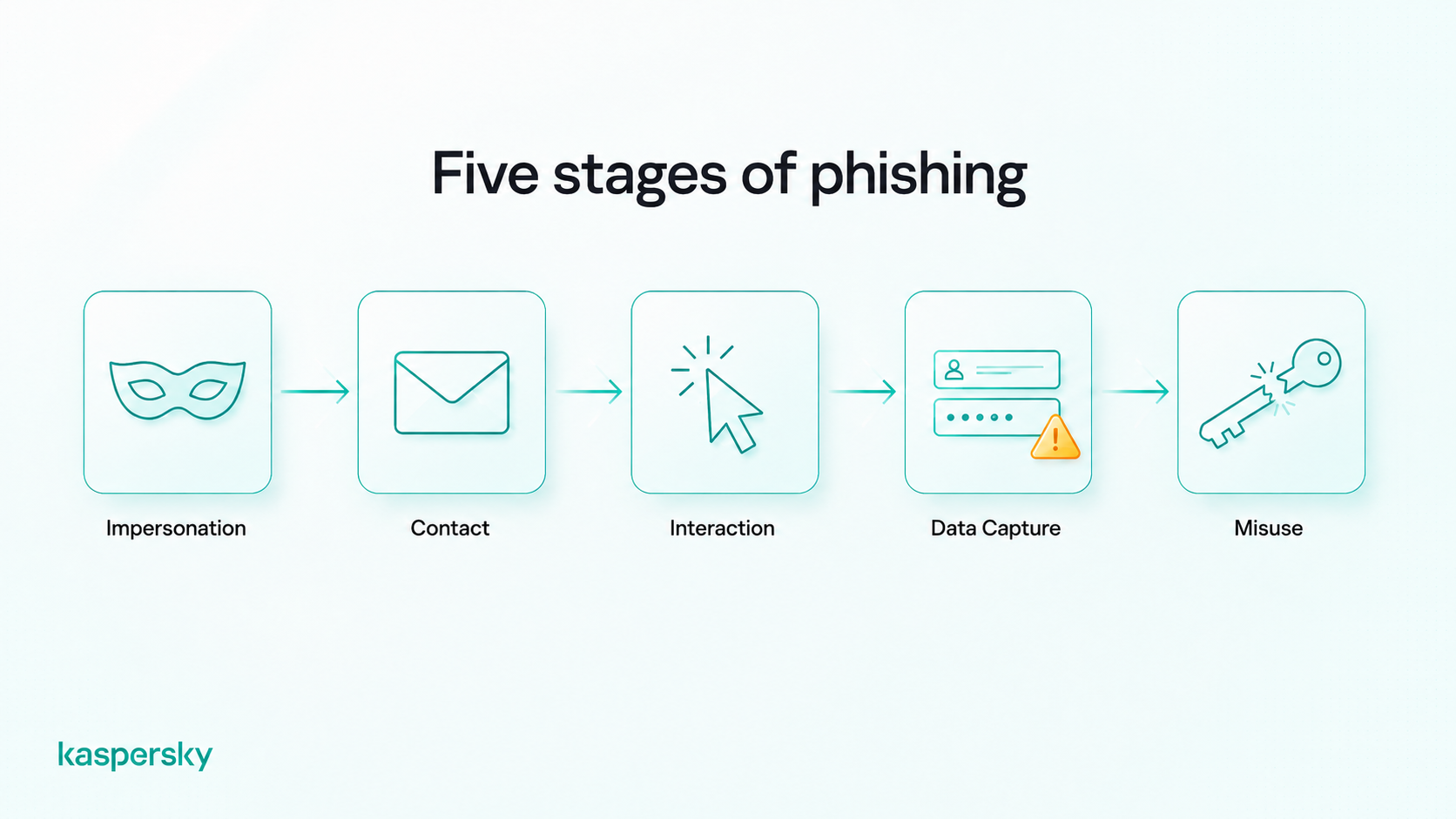
A typical phishing attack follows this pattern:
- Impersonation. The attacker pretends to be a trusted source. This could be something like a bank or an employer.
- Contact. The message arrives by email or another channel and often uses familiar branding or spoofed sender details.
- Interaction. The victim is asked to click a link, open an attachment, reply with information, or log in through a fake website.
- Data capture. The fake page or file may collect passwords and other sensitive information.
- Misuse. The attacker uses that information for an attack. This might come in the form of account takeover or identity theft.
The danger is that phishing often looks legitimate. A fake login page may look almost identical to the real one. A spoofed email may use the same logo and tone as a brand you know. That is why visual appearance alone is not enough to determine whether a message is safe.
Why do phishing attacks succeed?
Phishing succeeds because it targets human behavior. Attackers know what makes people act. They rely on pressure or build trust that they can then abuse.
Urgent warnings about account closure, unpaid bills, suspicious logins, or missed deliveries are designed to reduce careful thinking. Authority also plays a role. A message that appears to come from a bank or government agency can feel harder to question.
Even tech-savvy people can be affected. This is especially true when they are distracted or dealing with a message that feels personal. Phishing works when it creates a moment where reacting feels easier than verifying or taking time to check.
What types of phishing attacks exist?
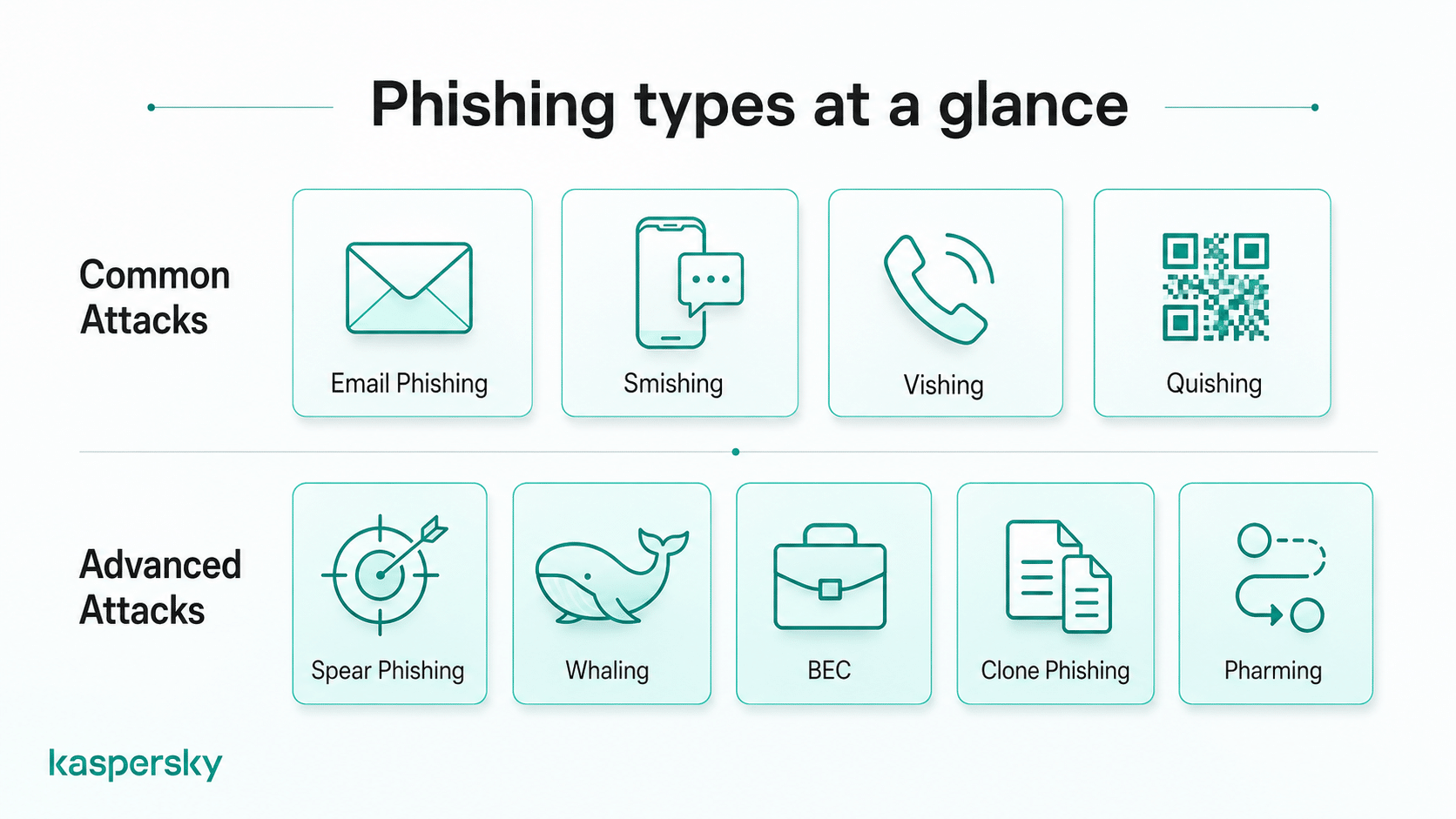
Phishing attacks can be grouped by how the message is delivered and how precisely the target is chosen. Some attacks are broad campaigns sent to thousands of people at once, while others are carefully tailored to a specific individual or organization.
Understanding these categories helps users recognize threats quickly and respond appropriately, regardless of the channel used.
What are the most common phishing attacks?
These attacks rely on widely used communication channels and are typically distributed in large numbers.
- Email phishing uses bulk messages that impersonate trusted brands or services to collect login credentials or personal data
- Smishing uses text messages (SMS) to prompt recipients to click links, call numbers, or share sensitive information
- Vishing uses phone calls or voice messages where attackers impersonate support staff, banks, or government agencies
- Quishing uses malicious QR codes that redirect users to fraudulent websites or trigger unsafe downloads
These methods are common because they are easy to scale and reach large audiences quickly.
What are advanced phishing attacks?
Advanced phishing attacks focus on specific targets or use more sophisticated techniques to increase credibility and bypass basic defenses.
- Spear phishing targets a particular individual or group using personalized information
- Whaling targets senior executives or decision-makers who have access to sensitive data or financial authority
- Business Email Compromise (BEC) involves impersonating trusted business contacts to request payments or sensitive information
- Clone phishing copies legitimate messages and replaces links or attachments with malicious versions
- Pharming redirects users to fraudulent websites by manipulating technical settings such as domain or network configurations
What does a phishing message look like?
A phishing message often looks like a legitimate email, text message, workplace request, or account alert designed to convince the recipient that the communication is real.
Many phishing messages imitate trusted brands closely, but unusual requests, unexpected attachments, or links to unfamiliar domains can still signal fraud.
Here are common real-world scenarios users encounter:
- A delivery notification claims a package cannot be delivered and asks you to click a link to confirm your address.
- A bank alert warns of suspicious activity and directs you to log in immediately to secure your account.
- A workplace message appears to come from a manager requesting an urgent payment or document.
- A password reset email arrives unexpectedly, asking you to verify your account through a provided link.
- A text message from a service provider says your account will be suspended unless you confirm billing details.
- A QR code on a poster or email directs you to scan it to claim a discount or update account information.
These messages often look normal because they copy real communication patterns people see every day.
How can you recognize a phishing attempt?
You can recognize a phishing attempt by looking for unusual requests, unexpected urgency, suspicious links, or messages that do not match the normal behavior of the sender.
Use this decision framework:
- Was this message expected? Unexpected requests for passwords or verification are a common warning sign.
- Is there pressure to act quickly? Urgent deadlines, threats, or warnings are often used to reduce careful thinking.
- Does the request involve sensitive information? Legitimate organizations rarely ask for passwords or financial details through email or text.
- Does the message ask for verification, payment, login credentials, or sensitive information? Unexpected requests involving sensitive actions are a common phishing tactic.
- Does the sender match the context? Check whether the message makes sense for the situation, not just whether the name or logo looks correct.
- Can you verify the request through another channel? Contact the organization directly using official contact details if something feels unusual.
The safest response is to pause and verify before taking action.
What should you check before interacting with a message?
Before interacting at all, run through a quick verification checklist.
- Confirm the sender’s identity. Check that the email address, phone number, or domain matches the organization’s official contact details. Small spelling changes or unusual domains are common warning signs.
- Check whether the URL matches the organization’s official domain. Secure HTTPS connections and SSL certificates encrypt communication, but they do not guarantee that a website is legitimate.
- Question unexpected urgency. Messages that demand immediate action, threaten consequences, or create pressure to respond quickly should be treated with caution.
- If any of these checks raise doubts, pause and verify the request through official channels before continuing.
What will legitimate companies never ask you to do?
Legitimate organizations should follow strict security practices and do not request sensitive actions through informal or insecure channels.
- They will never ask for sensitive details (password, PIN, or full security code) by email or phone.
- They will never demand urgent payments or transfers without proper verification and established procedures.
- They will never ask you to bypass security controls such as disabling protections or sharing one-time codes.
Treat any of these actions as suspicious and verify the request independently before responding.
How is phishing evolving?
Phishing is shifting to targeted and data-driven campaigns that use real information about victims. Attackers now combine leaked credentials and automated tools to create messages that feel more believable and harder to detect.
Technology has also changed how phishing is delivered. Attackers increasingly use multiple channels at once: text messages, messaging apps, phone calls, social media…the list goes on. This approach increases the chances that a victim will respond.
Automation plays a major role in this evolution. Modern phishing operations can send thousands of tailored messages in minutes. They can test which versions succeed and quickly adjust tactics. The core deception remains the same, but the tools used to create and deliver phishing attacks are becoming more advanced.
How is AI used in phishing attacks?
Artificial intelligence allows attackers to create more convincing messages with less effort. AI tools can generate realistic language and tailor messages to specific individuals using publicly available information.
AI also removes many of the traditional warning signs that once helped users spot scams. This includes things like poor grammar or unusual wording. AI technology also allows attackers to scale campaigns quickly. They can send large volumes of personalized messages across different platforms.
What new phishing techniques are emerging?
Phishing is expanding beyond traditional email into coordinated, multi-channel attacks that follow victims across devices and communication methods.
- Multichannel phishing combines email, SMS, voice calls, and messaging apps to increase credibility and persistence
- Deepfake impersonation uses synthetic voice or video to imitate trusted individuals, such as managers, coworkers, or family members.
- QR code phishing (quishing) uses malicious codes to redirect users to fraudulent websites or trigger unsafe downloads
These techniques reflect a broader trend: phishing is becoming more adaptive and harder to recognize using simple visual cues alone.
Modern phishing requires layered protection, combining cautious behavior with security tools that can detect malicious links, files, and websites.
Protect your privacy
Kaspersky Premium offers various tools designed to protect your devices from Phishing attacks, monitor for data leaks and keep your activity private.
Try Premium for FreeWhat happens if you fall for a phishing scam?
The impact of a phishing scam depends on what information was shared and how quickly the attacker acts.
A common outcome is account takeover. Attackers use stolen credentials to access your accounts. This includes email and social media, shopping, or banking accounts. Once inside, they may change passwords, send messages from the account, or use it to reset access to other services.
Financial loss is another frequent result. Attackers may make unauthorized purchases or open new accounts using stolen details. Even small pieces of information can be combined to commit identity theft or fraud later.
Long-term effects can include ongoing privacy exposure, damaged credit, and repeated scam attempts. Stolen data is often reused, shared, or sold, meaning victims may face risks months or even years after the initial incident.
What should you do if you receive a phishing message?
The safest response to a phishing message is to pause and handle it carefully. Acting quickly without interacting with the message helps reduce the risk of compromise.
- Do not click links, open attachments, or reply to the message
- If the message appears to target a real organization, contact the company directly through its official website or support channels.
- Keep the message available if you need to report it, but avoid interacting with its links or attachments.
- Delete the message or mark it as spam once you confirm it is fraudulent
- Report the message to your email provider or workplace security team if applicable
- Block the sender
This process helps prevent accidental interaction and reduces the chance that similar scams will reach others.
What should you do if you clicked a phishing link?
Clicking a phishing link does not always mean your device or accounts are compromised, but it does increase risk. The priority is to act quickly to contain potential damage and secure your information.
Your response should focus on locking down accounts and checking for unauthorized activity. You can then focus on reducing the chance of further misuse. Early action can prevent attackers from gaining control of your accounts and information.
What should you do immediately?
Take these steps as soon as possible, starting with the accounts most likely to be affected.
- Change passwords for the affected account and any other accounts that use the same or similar credentials
- Enable multi-factor authentication (MFA) to block unauthorized logins, even if passwords were exposed
- Contact your bank or service provider if financial or sensitive account details may have been entered
These actions help secure access quickly and limit the attacker’s ability to use stolen information.
How can you reduce ongoing risk?
The immediate response is just one part of the equation. You need to continue monitoring and securing your devices and accounts to catch delayed or hidden activity.
- Run a security scan on your device to check for malware or unauthorized software
- Monitor accounts and statements for unfamiliar logins or changes
- Report the incident to relevant authorities or organizations if personal or financial data may have been compromised
Ongoing vigilance is important because stolen data can be used days or weeks after the original phishing attempt.
How can you prevent phishing attacks?
Preventing phishing requires a combination of everyday habits and protective technology. Most successful attacks rely on rushed decisions or weak account security, so consistent routines and safeguards make a significant difference.
Long-term protection comes from verifying requests, slowing down before acting, and using built-in security tools that detect suspicious activity.
What habits reduce phishing risk?
Simple habits can reduce exposure to phishing attempts and make suspicious messages easier to identify. Recognizing how phishing links are disguised helps users avoid one of the most common routes to credential theft.
- Make independent verification a routine habit for unexpected requests
- Avoid acting under pressure. A huge percentage of phishing messages create urgency or demand immediate action
- Treat unexpected communication as suspicious, particularly when it asks for sensitive information or unusual actions
These habits help users pause and evaluate risk before interacting.
What security measures provide strong protection?
Technical safeguards add an additional layer of defense and help block attacks even when a phishing message is convincing.
- Use multi-factor authentication (MFA) to prevent unauthorized account access
- Enable built-in platform protections from providers such as Google, Apple, and Microsoft, including security alerts and login verification
- Use trusted cybersecurity software to detect malicious links, attachments, and suspicious activity
These measures reduce the likelihood that a single mistake leads to account compromise.
What is the most important rule to avoid phishing?
Verify before you act.
If a message asks for information or urgent action (or worse, money) confirm the request through a trusted source before responding. A quick verification step is often enough to stop a phishing attack before it succeeds.
Related Articles:
- How should you approach handling phishing attacks effectively?
- What are the main dangers of spear phishing attacks?
- What are the dangers of Spam phishing attacks?
- How can you identify a phishing email effectively?
Related Products:
FAQ
How do phishing emails look so real?
Phishing emails look convincing because attackers copy real logos and language you’re likely to see from trusted companies. They may also use stolen data or AI tools to personalize messages and remove obvious mistakes.
Can you get phishing messages on social media?
Yes. Phishing can occur on social media through direct messages, fake profiles, or posts containing malicious links. Attackers often impersonate friends or popular brands to gain trust.
Why am I getting phishing emails all of a sudden?
A sudden increase in phishing emails can happen if your address was exposed in a data breach or added to spam lists. Attackers may also send large campaigns to many people at once.
Can you get hacked just by opening a phishing email?
In most cases, simply opening an email is not enough to compromise a device. Risk usually begins when a user clicks a malicious link, downloads a file, or enters sensitive information.